WPA3 Explained: How SAE Stops Offline Password Cracking
WPA3 replaces password guessing with a handshake that ensures every session key is unique, rendering offline dictionary attacks ineffective even if the password is weak.
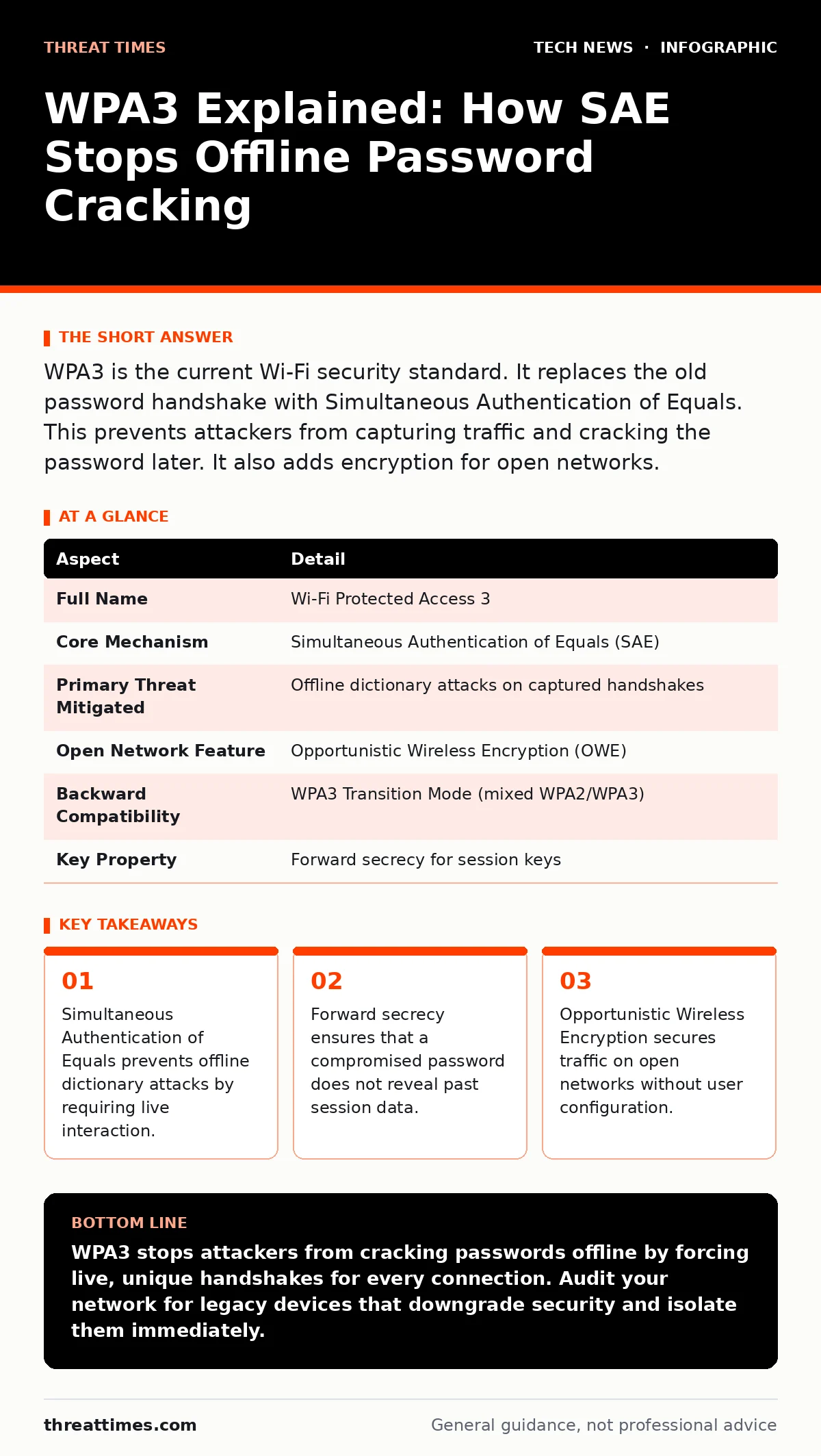
WPA3 is the current Wi-Fi security standard. It replaces the old password handshake with Simultaneous Authentication of Equals. This prevents attackers from capturing traffic and cracking the password later. It also adds encryption for open networks.
The Digital Handshake Problem
Imagine you leave your house key under a mat. Anyone can take a photograph of the key, go home, and try to copy it without ever touching your door. This is how WPA2 security often fails. An attacker captures the initial connection handshake, saves it, and spends weeks trying passwords offline. If the password is weak, they eventually succeed.
WPA3 changes this dynamic. It ensures that the attacker cannot copy the key from a photograph. Instead, the attacker must stand at your door and try the key in real time. If they guess wrong, the door stays locked, and they learn nothing new about the key’s shape. This shift from offline cracking to online guessing is the core improvement of the standard.
| Aspect | Detail |
|---|---|
| Full Name | Wi-Fi Protected Access 3 |
| Core Mechanism | Simultaneous Authentication of Equals (SAE) |
| Primary Threat Mitigated | Offline dictionary attacks on captured handshakes |
| Open Network Feature | Opportunistic Wireless Encryption (OWE) |
| Backward Compatibility | WPA3 Transition Mode (mixed WPA2/WPA3) |
| Key Property | Forward secrecy for session keys |
Simultaneous Authentication of Equals
The engine behind WPA3 is Simultaneous Authentication of Equals, or SAE. This protocol replaces the Pre-Shared Key handshake used in WPA2. In WPA2, the client and access point exchange messages that allow an eavesdropper to verify password guesses later. SAE uses a Dragonfly handshake, which is based on a key exchange method similar to Diffie-Hellman.
During an SAE handshake, the client and the access point prove they know the password without sending the password itself. More importantly, they derive a unique pairwise master key for that specific session. If an attacker captures this exchange, they cannot test a password guess against it. Each guess requires a new connection attempt with the access point.
This creates a natural rate limit. The access point can detect repeated failed attempts and block the attacker’s device. You can no longer run millions of guesses per second on a powerful computer at home. You are forced to interact with the network, which is noisy and detectable.
Forward Secrecy in Wireless Networks
Forward secrecy is a property where the compromise of long-term credentials does not compromise past session data. In WPA2, if an attacker eventually cracks your Wi-Fi password, they can decrypt every packet they captured in the past. They hold the key to the entire history of your network traffic.
WPA3 provides forward secrecy for the session keys. Because each session generates a unique key derived from the SAE handshake and random nonces, cracking the password today does not help decrypt traffic from last week. The attacker would need the specific random values from that past session, which are not stored or transmitted in a reusable form.
This does not mean your password is unimportant. A weak password still allows an attacker to connect to your network now. But it prevents the retrospective exposure of sensitive data that occurred in previous WPA2 deployments. This is a critical distinction for long-term data protection.
Protecting Open Networks
Open Wi-Fi networks, such as those in coffee shops or airports, have traditionally offered no encryption. Anyone on the network can see the traffic of everyone else. You might rely on HTTPS to protect your data, but many applications and devices do not use strong encryption by default.
WPA3 introduces Opportunistic Wireless Encryption, or OWE. This feature allows open networks to provide encryption without requiring a password. The access point and the client perform a key exchange automatically. The traffic is encrypted, preventing local eavesdropping.
OWE does not authenticate the network. You still need to trust that you are connecting to the legitimate access point and not an evil twin. It does not stop an attacker from redirecting you to a fake login page. However, it stops a casual attacker from sniffing unencrypted HTTP traffic or DNS queries on the same network.
The Transition Trap
Most networks do not switch to WPA3 overnight. They use WPA3 Transition Mode, which allows both WPA2 and WPA3 devices to connect. This seems convenient, but it introduces a significant vulnerability. If a single WPA2 device connects to the network, the security level for that session drops to WPA2 standards.
An attacker can target those WPA2 connections. They can capture the handshake from a legacy device and attempt offline cracking. The presence of one weak link undermines the security of the entire network segment. The access point cannot enforce WPA3 protections on a client that does not support them.
You must audit your device inventory. Identify all IoT devices, older laptops, and mobile phones that only support WPA2. Decide whether to isolate them on a separate VLAN or network, or replace them. Leaving them on the main network negates the benefits of the upgrade.
What People Usually Get Wrong
Many assume that WPA3 makes passwords irrelevant. This is false. SAE makes cracking harder, but it does not make it impossible. A very short or common password can still be guessed through online attacks, especially if the access point does not enforce strict rate limiting. You must still use long, complex passphrases.
Another misconception is that WPA3 protects against all Wi-Fi attacks. It does not protect against rogue access points, evil twins, or deauthentication attacks. It secures the link between the client and the legitimate access point. It does not verify the identity of the access point itself in personal mode. For enterprise environments, WPA3-Enterprise provides stronger authentication using certificates.
Integration with Broader Defenses
WPA3 is a layer of defense, not a complete solution. It sits alongside other security measures. For example, certificate management becomes more relevant in enterprise WPA3 deployments, where digital certificates authenticate devices rather than passwords. Properly managing these certificates prevents unauthorized devices from joining the network.
In the context of smart home security, WPA3 is particularly valuable. Many smart devices have weak or hardcoded credentials. While WPA3 cannot fix a device with a hardcoded password, it prevents the offline cracking of that password if the device supports SAE. For devices that do not, segmentation is required.
Consider how edge computing architectures rely on secure local networks. If the local Wi-Fi is compromised, the edge nodes may be accessed directly. WPA3 reduces the risk of this lateral movement by making the initial network penetration significantly harder. It complements virtualization security by ensuring that the physical network layer does not become the weakest link in a virtualized infrastructure.
Practical Implementation Steps
To implement WPA3 effectively, start with your access points. Ensure they support the latest firmware. Enable WPA3-Personal for home or small office networks. For larger organizations, evaluate WPA3-Enterprise to leverage existing directory services.
Do not enable Transition Mode unless you have a clear plan to migrate or isolate legacy devices. If you must use it, monitor the logs for WPA2 connections. Identify the devices causing the downgrade and address them. This might involve replacing hardware or creating a separate guest network for legacy devices.
Finally, update your security policies. Document the requirement for WPA3 on all new devices. Include this in your procurement checklist. As Wi-Fi security evolves, maintaining a baseline of modern protocols is necessary to reduce the attack surface.
Key takeaways
- Simultaneous Authentication of Equals prevents offline dictionary attacks by requiring live interaction.
- Forward secrecy ensures that a compromised password does not reveal past session data.
- Opportunistic Wireless Encryption secures traffic on open networks without user configuration.
- WPA3 is backward compatible with WPA2 devices through a transition mode that carries risk.
WPA3 stops attackers from cracking passwords offline by forcing live, unique handshakes for every connection. Audit your network for legacy devices that downgrade security and isolate them immediately.
Frequently asked questions
Does WPA3 work with older devices?
WPA3 can work with older devices in Transition Mode, but this reverts the security to WPA2 standards for those specific connections, creating a vulnerability.
Is WPA3 secure enough for enterprise use?
Yes, WPA3-Enterprise offers stronger security than WPA2-Enterprise by adding forward secrecy and stronger authentication mechanisms, though it requires compatible client devices.
Can WPA3 prevent evil twin attacks?
No, WPA3 secures the encryption between the client and the access point but does not verify the identity of the access point itself in personal mode.
Do I need to change my Wi-Fi password after upgrading to WPA3?
You do not need to change the password, but you should ensure it is strong, as online guessing attacks are still possible if rate limiting is not enforced.
How this guide was produced: written by the Threat Times editorial team with AI assistance, checked against the public references listed below, and reviewed when the facts change. See our editorial policy or report an error.