Virtualization Security: Benefits, Limits, and Deployment Reality
Virtualization isolates workloads but introduces a hypervisor attack surface that requires different controls than traditional physical server defense.
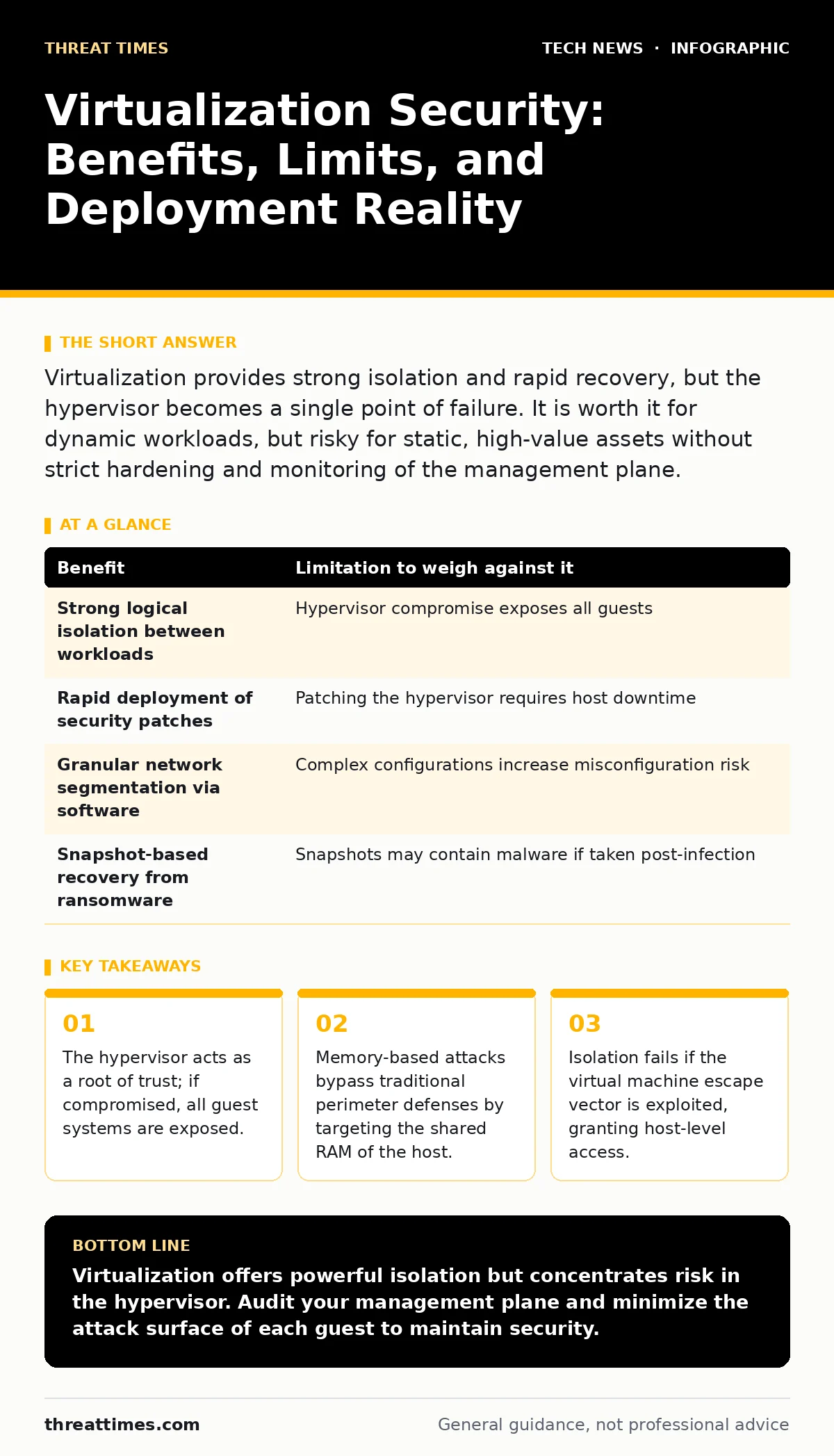
Virtualization provides strong isolation and rapid recovery, but the hypervisor becomes a single point of failure. It is worth it for dynamic workloads, but risky for static, high-value assets without strict hardening and monitoring of the management plane.
The Hypervisor as a New Trust Boundary
Virtualization replaces physical hardware with software-defined resources. The hypervisor, or virtual machine monitor, sits between the hardware and the operating systems. It allocates CPU, memory, and storage to each virtual machine. This abstraction creates a powerful security advantage: isolation. A breach in one virtual machine does not automatically spread to another. The hypervisor enforces strict boundaries between these isolated environments.
However, this convenience shifts the attack surface. In a physical setup, an attacker needs physical access or a network breach. In virtualization, the hypervisor itself becomes the critical component. If an adversary compromises the hypervisor, they control every virtual machine running on that host. This is known as a "single point of failure." The security posture now depends on the integrity of this software layer, not just the individual operating systems.
Resource Isolation and Attack Containment
The primary benefit of virtualization is the ability to contain threats. You can run untrusted code in a disposable virtual machine. If that machine is infected, you can snapshot, isolate, or delete it without affecting the host or other guests. This containment is particularly useful for testing suspicious files or running legacy applications that cannot be patched.
This isolation also allows for micro-segmentation. You can place virtual machines in different network segments without physical switches. Each segment can have its own firewall rules. This reduces the blast radius of a lateral movement attack. An attacker who compromises one server cannot easily jump to another unless they bypass the virtual network controls.
| Benefit | Limitation to weigh against it |
|---|---|
| Strong logical isolation between workloads | Hypervisor compromise exposes all guests |
| Rapid deployment of security patches | Patching the hypervisor requires host downtime |
| Granular network segmentation via software | Complex configurations increase misconfiguration risk |
| Snapshot-based recovery from ransomware | Snapshots may contain malware if taken post-infection |
The Hidden Cost of Management Complexity
Managing virtual environments introduces new risks. The management console, often called the vCenter or equivalent, controls the entire cluster. This interface is a high-value target. Attackers frequently target these consoles because they provide administrative access to all underlying hosts. If you secure the virtual machines but leave the management interface exposed, your defenses are bypassed.
Configuration drift is another silent threat. Administrators often copy virtual machine templates to speed up deployment. If the template contains a vulnerability or weak default settings, every new instance inherits those flaws. This creates a widespread, consistent vulnerability across the infrastructure. You must treat the template as a critical security asset, not just a convenience tool.
Memory and Side-Channel Vulnerabilities
Virtual machines share physical resources like CPU caches and memory controllers. Malicious code in one guest can sometimes monitor the usage patterns of another guest. This is known as a side-channel attack. By analyzing timing differences or cache hits, an attacker can infer data from a neighboring virtual machine. This happens even if the two machines are logically isolated.
These attacks are difficult to detect. They do not leave network logs or file system artifacts. Traditional antivirus software cannot see into the CPU cache. Mitigating these risks often requires hardware-level features or strict scheduling policies that prevent unrelated workloads from running on the same physical cores. This can reduce performance and increase costs.
When It Is Worth It
Virtualization security shines in dynamic environments. If your workloads change frequently, virtualization allows you to apply security policies at scale. You can automate the deployment of hardened images. This ensures consistency and reduces human error. For development and testing teams, the ability to spin up isolated environments quickly is invaluable.
It is also worth it for disaster recovery. Virtual machines can be moved between physical hosts without downtime. This mobility allows you to maintain availability even if a physical server fails. You can replicate virtual machines to a remote site and failover seamlessly. The speed of recovery is often faster than rebuilding physical servers.
When It Is Not Worth It
Virtualization adds complexity that may not be justified for static, low-risk workloads. If a server runs a single, unchanging application with no external exposure, the overhead of the hypervisor may introduce unnecessary risk. The hypervisor is complex software with a large attack surface. For simple tasks, bare metal servers are simpler to secure and audit.
It is not worth it for high-security zones requiring strict physical control. Some regulatory environments demand physical isolation for sensitive data. Virtualization shares physical resources, which can conflict with these requirements. If you cannot prove that the hypervisor is free from backdoors or vulnerabilities, virtualization may not meet compliance standards.
Integrating with Broader Security Controls
Virtualization security does not exist in a vacuum. It must integrate with other security domains. For instance, certificate management becomes more complex in virtual environments. Each virtual machine may need its own certificates for internal communication. Managing these lifecycles at scale requires automation. Failure to rotate certificates can lead to unauthorized access.
Similarly, APIs are the backbone of virtualization management. These interfaces allow automation but also provide attack vectors. If an API key is leaked, an attacker can create, modify, or delete virtual machines. You must secure these endpoints with strict authentication and authorization. This aligns with the principles found in guides on edge computing, where distributed resources require centralized policy enforcement.
Consider how Wi-Fi security principles apply to virtual networks. Just as physical networks require segmentation to prevent lateral movement, virtual networks need strict access controls. The same logic applies to laptop security; endpoints connecting to virtual infrastructure must be trusted. A compromised laptop can be used to launch attacks against the virtualization management plane.
Hardening the Virtualization Stack
Start by minimizing the attack surface. Disable unused features in the hypervisor. Remove unnecessary virtual hardware devices from guest machines. Each device is a potential driver vulnerability. Keep the hypervisor firmware and software updated. Vendor updates often address critical vulnerabilities in the virtualization layer.
Implement least privilege for management access. Administrators should only have the permissions they need for their specific tasks. Use role-based access control to limit who can modify virtual machine settings. Monitor the management plane for unusual activity. Look for unexpected creation or deletion of virtual machines. These actions often indicate a compromise.
Key takeaways
- The hypervisor acts as a root of trust; if compromised, all guest systems are exposed.
- Memory-based attacks bypass traditional perimeter defenses by targeting the shared RAM of the host.
- Isolation fails if the virtual machine escape vector is exploited, granting host-level access.
Virtualization offers powerful isolation but concentrates risk in the hypervisor. Audit your management plane and minimize the attack surface of each guest to maintain security.
Frequently asked questions
Can virtualization protect against ransomware?
It can limit spread through isolation, but if the hypervisor or backup system is compromised, all virtual machines are at risk.
Do I need separate firewalls for virtual machines?
Yes, virtual firewalls provide micro-segmentation, but they must be configured correctly to prevent lateral movement.
How this guide was produced: written by the Threat Times editorial team with AI assistance, checked against the public references listed below, and reviewed when the facts change. See our editorial policy or report an error.