Spot Location Tracking: Signs of Silent GPS and Wi-Fi Monitoring
Background location tracking often hides in seemingly harmless app behaviors, draining battery and mapping your movements without explicit consent.

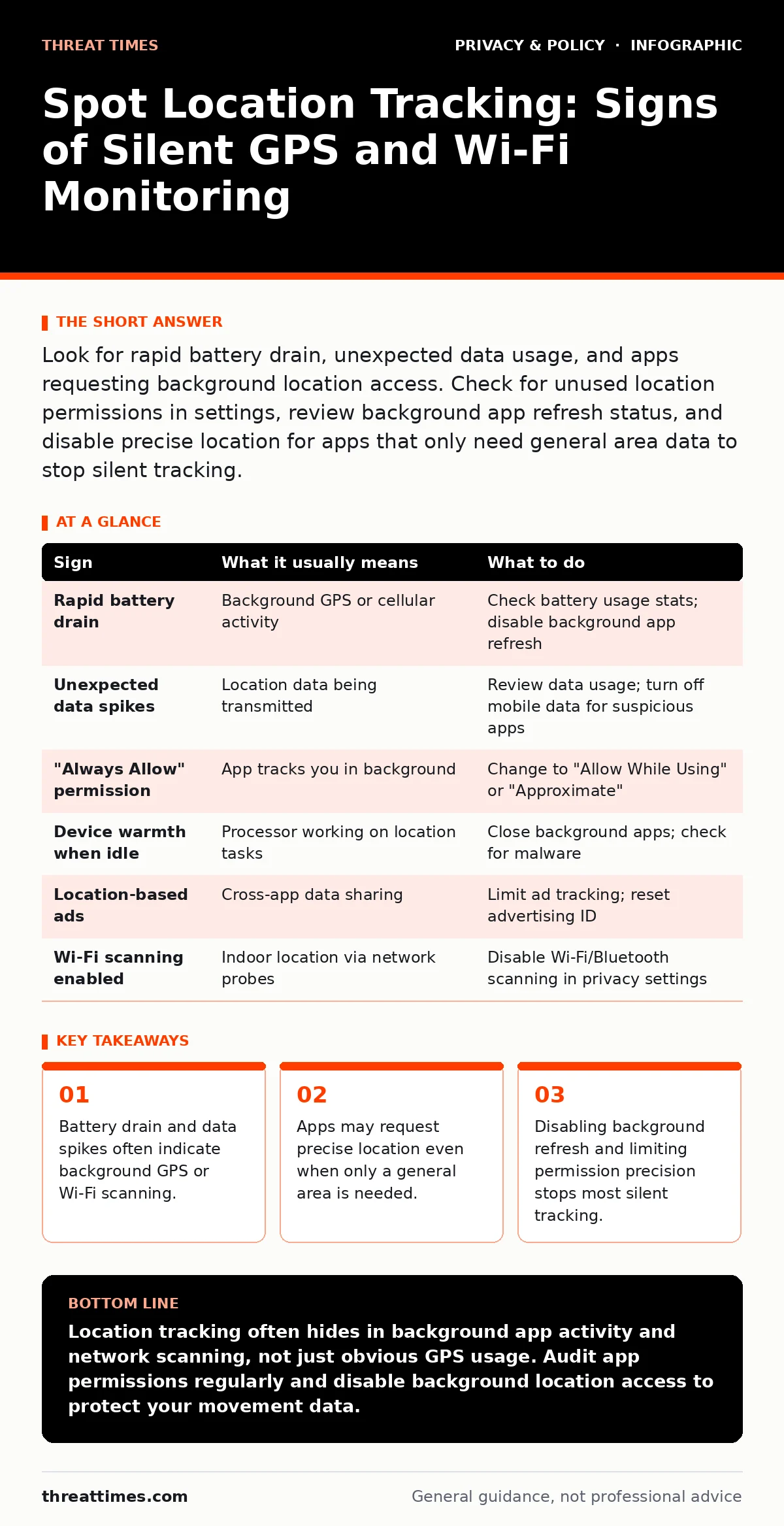
Look for rapid battery drain, unexpected data usage, and apps requesting background location access. Check for unused location permissions in settings, review background app refresh status, and disable precise location for apps that only need general area data to stop silent tracking.
The Immediate Hardware Signals
Your device often tells you when it is being watched before any software notification appears. The most obvious sign is rapid battery depletion. If your battery drops significantly while the device is idle or inside a building, the GPS receiver or cellular triangulation modules may be active. These components consume more power than standard display or audio functions.
You might also notice the device becoming warm to the touch. This heat comes from the processor working to compile location data and transmit it. Suppose you leave your phone on a desk for an hour and it feels warm afterward. This suggests continuous background activity rather than passive standby mode.
Location services transmit coordinates frequently, especially when an app runs in the background. If data consumption rises while you are offline or not using heavy applications, a background process is likely sending telemetry to a remote server.
Subtle Software Indicators
Not all tracking signs are as loud as battery drain. Some indicators are hidden in the operating system’s permission management. Look for apps that request "Always Allow" location access. This permission lets an app track you even when it is not open. Many social and utility apps request this level of access, but few actually need it to function.
Another subtle sign is the appearance of location-based ads. If you visit a store and immediately see ads for that store on unrelated platforms, your device likely shared your precise location with advertising networks. This cross-app tracking happens through shared identifiers and background location pings.
The Wi-Fi and Bluetooth Footprint
Location tracking does not rely solely on satellites. Your device scans for nearby Wi-Fi networks and Bluetooth beacons to determine its position. This method works indoors where GPS signals are weak. Even if you are not connected to a network, the scanning process reveals your location to nearby routers and devices.
Imagine you are in a coffee shop. Your phone scans for known Wi-Fi networks to help with navigation. The coffee shop’s router sees this scan. If the router is part of a larger tracking network, it logs your presence. You do not need to connect to the Wi-Fi for this tracking to occur. The act of scanning is enough to establish your location.
To mitigate this, you can disable Wi-Fi and Bluetooth scanning when they are not needed. However, this may disable features like automatic home connection or nearby device pairing. You must balance convenience against privacy. Check your settings for "Scanning always allowed" options and turn them off.
Permission Auditing and Revocation
Regularly auditing app permissions is the most effective defense. Go to your device’s location settings and review the list of apps with access. You will likely find many apps you rarely use. Each of these apps can potentially track your location if given permission.
Revoke access for any app that does not have a clear, functional need for location data. For apps that need location, choose "Allow Only While Using the App." This prevents background tracking. For apps that only need a general area, such as weather apps, choose "Approximate Location" if your operating system supports it. This hides your precise coordinates.
The Table of Signs and Responses
Use this table to quickly identify common signs of location tracking and determine the appropriate response.
| Sign | What it usually means | What to do |
|---|---|---|
| Rapid battery drain | Background GPS or cellular activity | Check battery usage stats; disable background app refresh |
| Unexpected data spikes | Location data being transmitted | Review data usage; turn off mobile data for suspicious apps |
| "Always Allow" permission | App tracks you in background | Change to "Allow While Using" or "Approximate" |
| Device warmth when idle | Processor working on location tasks | Close background apps; check for malware |
| Location-based ads | Cross-app data sharing | Limit ad tracking; reset advertising ID |
| Wi-Fi scanning enabled | Indoor location via network probes | Disable Wi-Fi/Bluetooth scanning in privacy settings |
Managing Third-Party Data Sharing
Even if you manage your device permissions, other vectors exist. Web browsers and apps often share location data with third-party services. This is where privacy policies and consent management become relevant. Many users ignore these documents, but they reveal how your data flows to external partners.
For web browsing, ensure your browser does not share location data with websites. Most modern browsers prompt you for permission. Always deny this request unless you are actively using a maps service. For mobile apps, check if the app uses third-party analytics or advertising SDKs. These SDKs often have their own permission requests and data collection practices.
Long-Term Monitoring Risks
The danger of location tracking is not just immediate privacy loss. It is the creation of a long-term profile. Over time, collected location data reveals your home, workplace, and routine. This profile can be used for targeted advertising, but also for more malicious purposes. If an attacker gains access to this data, they can predict your movements.
This is why workplace monitoring is a significant concern. Employers may track devices for security or productivity reasons. This tracking often bypasses personal privacy settings. You should understand your employer’s policies regarding device tracking. If you use a personal device for work, ensure there is a clear separation between work and personal data.
Final Mitigation Steps
If you suspect tracking, take immediate action. Start by resetting your advertising identifier. This breaks the link between your past behavior and future ads. Next, audit all app permissions and revoke unnecessary location access. Disable background app refresh for apps that do not need real-time updates.
Consider using encrypted messaging apps for sensitive communications. While these apps protect content, they may still access location data for features like map sharing. Disable location access for these apps unless you are actively sharing your location. For web browsing, using tools like Tor Browser can help anonymize your traffic, but it does not hide your physical location if your device’s GPS is on.
Remember that no single measure provides complete protection. You must layer defenses. Combine permission management, network scanning controls, and regular audits to reduce your location footprint. Stay alert for new signs, as tracking methods evolve.
Key takeaways
- Battery drain and data spikes often indicate background GPS or Wi-Fi scanning.
- Apps may request precise location even when only a general area is needed.
- Disabling background refresh and limiting permission precision stops most silent tracking.
Location tracking often hides in background app activity and network scanning, not just obvious GPS usage. Audit app permissions regularly and disable background location access to protect your movement data.
Frequently asked questions
Can apps track my location if I turn off GPS?
Yes, apps can still estimate your location using Wi-Fi networks, Bluetooth beacons, and cellular tower triangulation, even with GPS disabled.
Does "Approximate Location" stop all tracking?
It prevents apps from seeing your precise coordinates, but they can still know your general area, which may be enough for some tracking purposes.
Can I stop all location tracking on my device?
You can disable most tracking by revoking permissions and disabling scanning, but some system services may still use location for emergency or navigation features.
How this guide was produced: written by the Threat Times editorial team with AI assistance, checked against the public references listed below, and reviewed when the facts change. See our editorial policy or report an error.