Mobile App Permission Abuse: Debunking 6 Dangerous Myths
App permissions are not static grants but dynamic requests that can be exploited even after you revoke access, creating hidden data flows.
Common beliefs about app permissions hide significant privacy risks. Revoking access often fails to stop background data collection, and granular controls are frequently bypassed. Understanding the technical limits of operating system permissions is necessary to protect your personal data from subtle abuse.
Myth: Revoking Permission Stops Data Collection Immediately
Reality: Withdrawing access in your device settings does not erase what the application already knows. The app retains historical records of your location, contacts, or usage habits stored in its local cache or remote servers. Furthermore, many applications continue to infer sensitive data from other allowed permissions. For example, an app with access to your microphone can analyze ambient noise levels to guess your location, even if GPS access is denied. This residual knowledge remains valuable for profiling, regardless of current permission states.
Myth: If an App Does Not Ask, It Does Not Track
Reality: Applications often embed third-party software development kits that operate independently of the host app’s permission requests. These libraries can collect device identifiers, battery status, and network conditions without explicit user consent for those specific data points. The operating system may grant the main app broad access, which the embedded code then exploits for analytics. You see only the primary interface, but multiple invisible agents are harvesting metadata in the background. This hidden layer bypasses your direct interaction with the permission dialog entirely.
Suppose a simple flashlight app includes an advertising network library. That library might access your advertising ID and install date to build a profile, even though the flashlight function itself requires no such data. The abuse occurs outside the scope of the primary utility you intended to use.
Myth: Permission Requests Are Always Accurate Reflections of Need
Reality: Developers often request excessive permissions to maximize data harvesting rather than to fulfill core functionality. A weather application does not need access to your camera or contact list, yet it may ask for these to sell richer user profiles. This practice, known as permission creep, exploits user fatigue and the tendency to accept dialogs quickly. The operating system rarely validates whether a requested permission is technically necessary for the app’s stated purpose. You are often granting access for features that do not exist within the application.
Myth: Granular Permissions Provide Complete Protection
Reality: Modern operating systems offer fine-grained controls, such as allowing location access only while the app is in use. However, apps can exploit the ambiguity of "in use." Background services may keep the app technically active by running silent processes, thereby maintaining access to sensors.
Additionally, some applications use sensor fusion to combine low-precision data from multiple sources to approximate high-precision tracking. For instance, combining barometer data with Wi-Fi signal strength can yield accurate indoor positioning without traditional GPS permission. This technical workaround renders granular restrictions less effective than users assume.
Myth: Open-Source or Small Apps Are Less Likely to Abuse Permissions
Reality: Small development teams often lack the resources to implement proper data minimization and security hygiene. They may rely on complex, third-party frameworks that contain vulnerabilities or aggressive telemetry. An open-source application might have transparent code, but the binaries you install from app stores are often modified or bundled with proprietary analytics tools. The absence of a large corporate backend does not guarantee privacy; it often means fewer eyes scrutinizing the code for subtle permission abuses. Trusting an app based on its size is a dangerous heuristic.
Myth: You Can Fully Revoke Access by Uninstalling the App
Reality: Uninstalling an application removes its executable files but often leaves behind cached data, configuration files, or accounts linked to third-party services. If the app created a user profile on a remote server, that profile persists. Furthermore, some operating systems allow apps to reinstall automatically or restore settings from backups, effectively re-granting permissions without your explicit interaction. The digital footprint you leave behind is more durable than the application itself. This persistence means that your history of permission grants continues to influence your digital identity even after deletion.
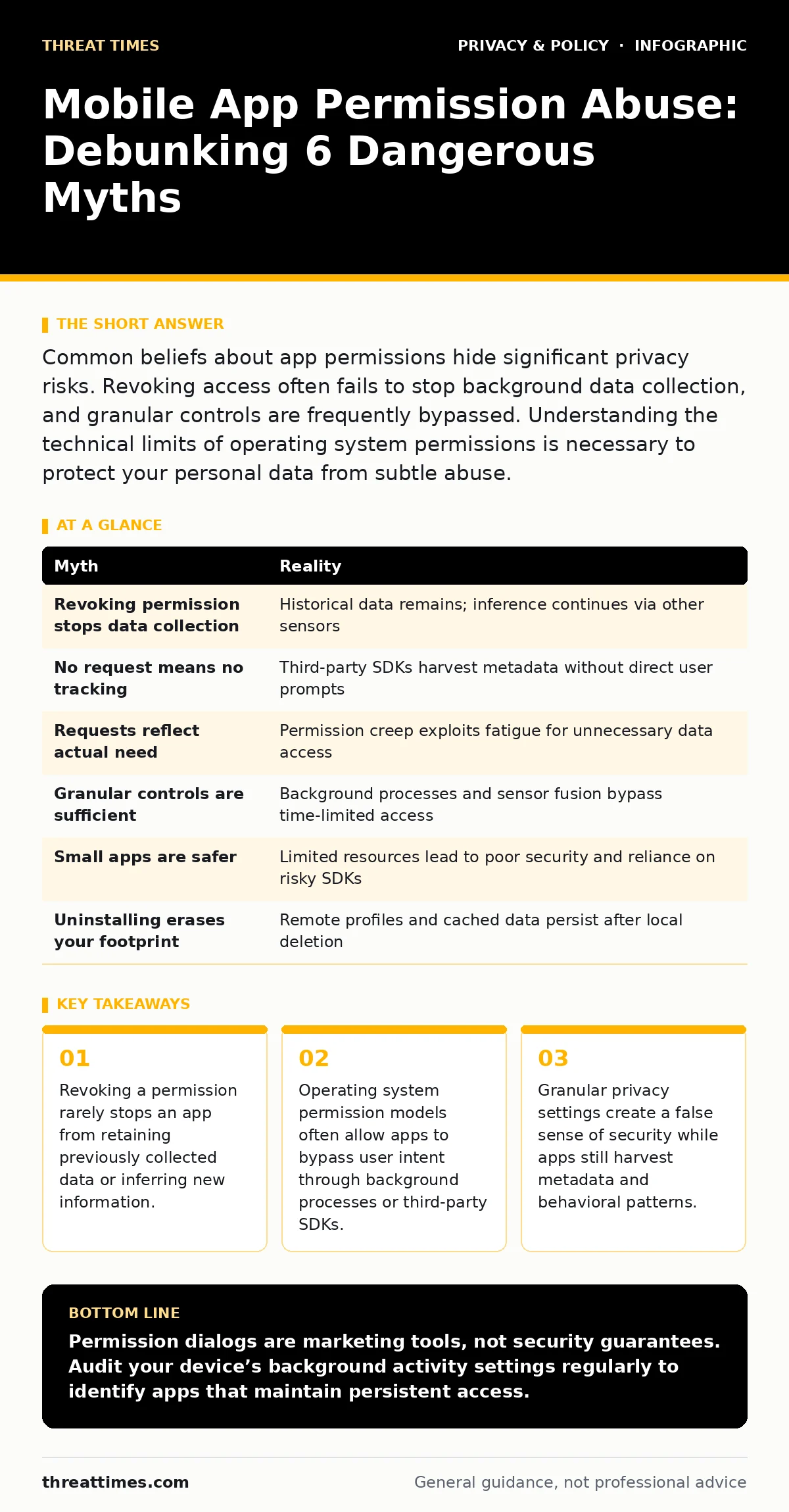
| Myth | Reality |
|---|---|
| Revoking permission stops data collection | Historical data remains; inference continues via other sensors |
| No request means no tracking | Third-party SDKs harvest metadata without direct user prompts |
| Requests reflect actual need | Permission creep exploits fatigue for unnecessary data access |
| Granular controls are sufficient | Background processes and sensor fusion bypass time-limited access |
| Small apps are safer | Limited resources lead to poor security and reliance on risky SDKs |
| Uninstalling erases your footprint | Remote profiles and cached data persist after local deletion |
Key takeaways
- Revoking a permission rarely stops an app from retaining previously collected data or inferring new information.
- Operating system permission models often allow apps to bypass user intent through background processes or third-party SDKs.
- Granular privacy settings create a false sense of security while apps still harvest metadata and behavioral patterns.
Permission dialogs are marketing tools, not security guarantees. Audit your device’s background activity settings regularly to identify apps that maintain persistent access.
Frequently asked questions
How do I know if an app is using my camera in the background?
Most modern operating systems provide a visual indicator, such as a green dot or icon, when the camera or microphone is active. If you see this indicator while the app is closed, it is accessing hardware without your direct interaction.
Do privacy policies accurately describe data usage?
Privacy policies are legal documents that often use ambiguous language to cover broad data collection practices. They rarely detail the specific technical mechanisms or third-party partners involved in data harvesting.
Can I block all background data for an app?
You can restrict background data usage in system settings, but this may break app functionality. Some apps will simply fail to update or sync rather than stop collecting data, shifting the abuse to local storage instead.
Is it safer to use encrypted messaging apps for all communication?
Encrypted messaging apps protect content in transit but may still collect metadata about who you talk to and when. They do not eliminate the need for careful permission management regarding contacts and storage access.
How this guide was produced: written by the Threat Times editorial team with AI assistance, checked against the public references listed below, and reviewed when the facts change. See our editorial policy or report an error.