Detect CI/CD Pipeline Vulnerabilities: Signals, Blind Spots and Tools
Pipeline logs often reveal lateral movement attempts that network perimeter sensors miss entirely because internal build agents operate with trusted credentials.

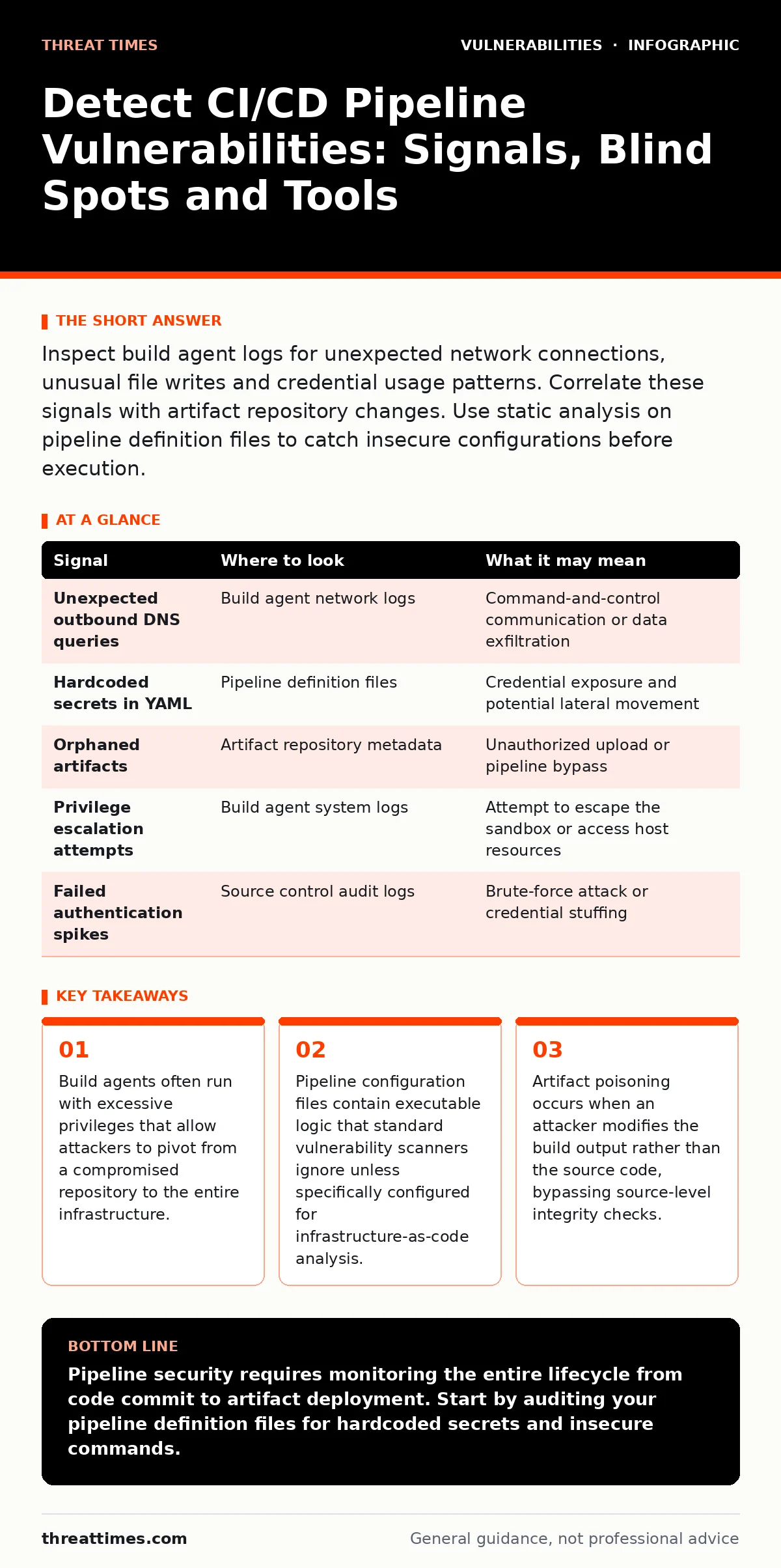
Inspect build agent logs for unexpected network connections, unusual file writes and credential usage patterns. Correlate these signals with artifact repository changes. Use static analysis on pipeline definition files to catch insecure configurations before execution.
Identify Anomalous Build Agent Behavior
Build agents execute code in isolated environments, but they maintain network connectivity to fetch dependencies and push artifacts. An attacker who compromises a repository can inject malicious instructions into the pipeline definition. The build agent executes these instructions with the permissions granted to the service account. Look for outbound connections from the build agent to unknown IP addresses or domains that do not match known dependency repositories. These connections often indicate data exfiltration or command-and-control communication.
The build agent may also attempt to write files to locations outside the designated build workspace. Standard pipelines restrict file system access to the temporary build directory. Any attempt to write to system directories, configuration folders or other build agents suggests an attempt to establish persistence or modify system behavior. Monitor file system calls during the build process. Flag any write operations that target paths unrelated to the software compilation or testing steps.
Analyze Pipeline Definition Files for Insecure Logic
Pipeline definition files describe the steps required to build, test and deploy software. These files are often written in YAML or similar markup languages. They are treated as code but are rarely subject to the same security reviews as application source code. Attackers look for weak points in these definitions to inject malicious commands. Check for hardcoded secrets in the pipeline configuration. Credentials stored directly in the file are visible to anyone with read access to the repository.
Search for commands that use unsanitized user input. If a pipeline accepts parameters from pull requests or merge requests, those parameters might contain shell commands. An attacker can inject a malicious command that the build agent executes with elevated privileges. This technique exploits the trust the build system places in the pipeline definition. Validate all external inputs before they are passed to shell commands or script executions.
Monitor Artifact Repository Integrity
Artifact repositories store the compiled binaries, containers and packages produced by the build process. These artifacts are trusted by the deployment stage. If an attacker modifies the artifact after it is built but before it is deployed, the deployment proceeds with malicious software. Compare the checksums of artifacts against the expected values generated during the build. Any mismatch indicates that the artifact was altered after the build completed.
Check for artifacts that appear in the repository without a corresponding build record. Legitimate artifacts are always the result of a specific build job. Orphaned artifacts may have been pushed manually by an attacker who gained access to the repository credentials. Implement strict access controls that prevent direct uploads to the artifact repository. Only the build automation system should have write access to the storage location.
Correlate Logs Across the Pipeline Stages
CI/CD pipelines consist of multiple stages, each generating its own logs. Isolating these logs makes it difficult to see the full picture of an attack. Correlate logs from the source control system, the build agent and the artifact repository. Look for sequences of events that do not follow the standard workflow. For example, a build that succeeds immediately after a code change that was rejected by peer review may indicate unauthorized modification.
| Signal | Where to look | What it may mean |
|---|---|---|
| Unexpected outbound DNS queries | Build agent network logs | Command-and-control communication or data exfiltration |
| Hardcoded secrets in YAML | Pipeline definition files | Credential exposure and potential lateral movement |
| Orphaned artifacts | Artifact repository metadata | Unauthorized upload or pipeline bypass |
| Privilege escalation attempts | Build agent system logs | Attempt to escape the sandbox or access host resources |
| Failed authentication spikes | Source control audit logs | Brute-force attack or credential stuffing |
Address Common Blind Spots in Detection
Security teams often focus on the application code and neglect the pipeline infrastructure. This creates a blind spot where attacks go undetected. One common blind spot is the assumption that build agents are fully isolated. In practice, agents often share network segments with production systems or other sensitive environments. Another blind spot is the lack of visibility into third-party plugins and extensions used in the pipeline. These plugins run with the same privileges as the pipeline itself.
Teams also overlook the security of the underlying infrastructure. The virtual machines or containers hosting the build agents may contain vulnerabilities. If an attacker exploits a vulnerability in the host operating system, they can compromise the entire build environment. Regularly patch the build agent infrastructure. Use ephemeral build environments that are destroyed after each build to reduce the risk of persistence.
Leverage Tools for Continuous Monitoring
Automated tools are necessary to detect anomalies at scale. Static application security testing tools can analyze pipeline definition files for insecure patterns. Dynamic analysis tools can monitor the behavior of build agents during execution. Look for tools that support infrastructure-as-code scanning. These tools identify misconfigurations in the pipeline setup before the code is executed.
Integrate these tools into the development workflow. Security checks should run automatically when developers push code or modify pipeline definitions. Delaying security checks until after deployment increases the cost of remediation and the risk of exposure. Use security orchestration and automation platforms to correlate alerts from different sources. This reduces noise and helps analysts focus on high-fidelity threats.
Prevent Credential Theft and Lateral Movement
Credentials are the primary target in CI/CD attacks. Attackers seek access tokens, API keys and service account passwords to move laterally within the environment. Rotate credentials regularly and limit their scope. Use short-lived tokens that expire after a single use or a short duration. Store credentials in a dedicated secrets management system rather than in environment variables or configuration files.
Imagine a scenario where an attacker compromises a developer's workstation and steals a personal access token. The attacker uses this token to push malicious code to a repository. The CI/CD pipeline triggers and builds the malicious code. The build agent, using its own service account credentials, deploys the malicious artifact to production. This chain of events demonstrates how a single compromised credential can lead to a full infrastructure breach.
Validate Supply Chain Integrity
Modern software relies on external dependencies. Attackers often compromise these dependencies to infect downstream applications. Verify the integrity of all external dependencies before they are used in the build process. Use checksums and digital signatures to ensure that dependencies have not been tampered with. Pin dependencies to specific versions to prevent automatic updates from introducing vulnerabilities.
Refer to guidelines on insecure deserialization when handling external inputs in your pipeline scripts. Malformed data can trigger unexpected behavior in the build agents. Also, consider the risks associated with GraphQL vulnerabilities if your pipeline interacts with external APIs that use this protocol. Ensure that all external communications are encrypted and authenticated. Validate the schema of incoming data to prevent injection attacks.
Key takeaways
- Build agents often run with excessive privileges that allow attackers to pivot from a compromised repository to the entire infrastructure.
- Pipeline configuration files contain executable logic that standard vulnerability scanners ignore unless specifically configured for infrastructure-as-code analysis.
- Artifact poisoning occurs when an attacker modifies the build output rather than the source code, bypassing source-level integrity checks.
Pipeline security requires monitoring the entire lifecycle from code commit to artifact deployment. Start by auditing your pipeline definition files for hardcoded secrets and insecure commands.
Frequently asked questions
How do I detect if a build agent has been compromised?
Look for unexpected network connections, unauthorized file writes and anomalous process execution in the build agent logs. Compare the current state of the agent against a known good baseline.
What are the signs of a poisoned artifact?
Check for checksum mismatches between the build output and the stored artifact. Look for artifacts that appear in the repository without a corresponding build record in the CI/CD logs.
Can pipeline definitions contain malware?
Yes, pipeline definitions are executable code. Attackers can inject malicious commands into YAML or JSON files that the build agent executes with elevated privileges during the build process.
How do I secure third-party plugins in my pipeline?
Verify the integrity of plugins using checksums and digital signatures. Restrict the permissions granted to plugins and monitor their network activity for unexpected outbound connections.
How this guide was produced: written by the Threat Times editorial team with AI assistance, checked against the public references listed below, and reviewed when the facts change. See our editorial policy or report an error.