Virus vs Malware: Defining the Difference in Scope and Behavior
A computer virus is a specific replication method, while malware is the broad category of all hostile software that includes viruses, worms, and trojans.

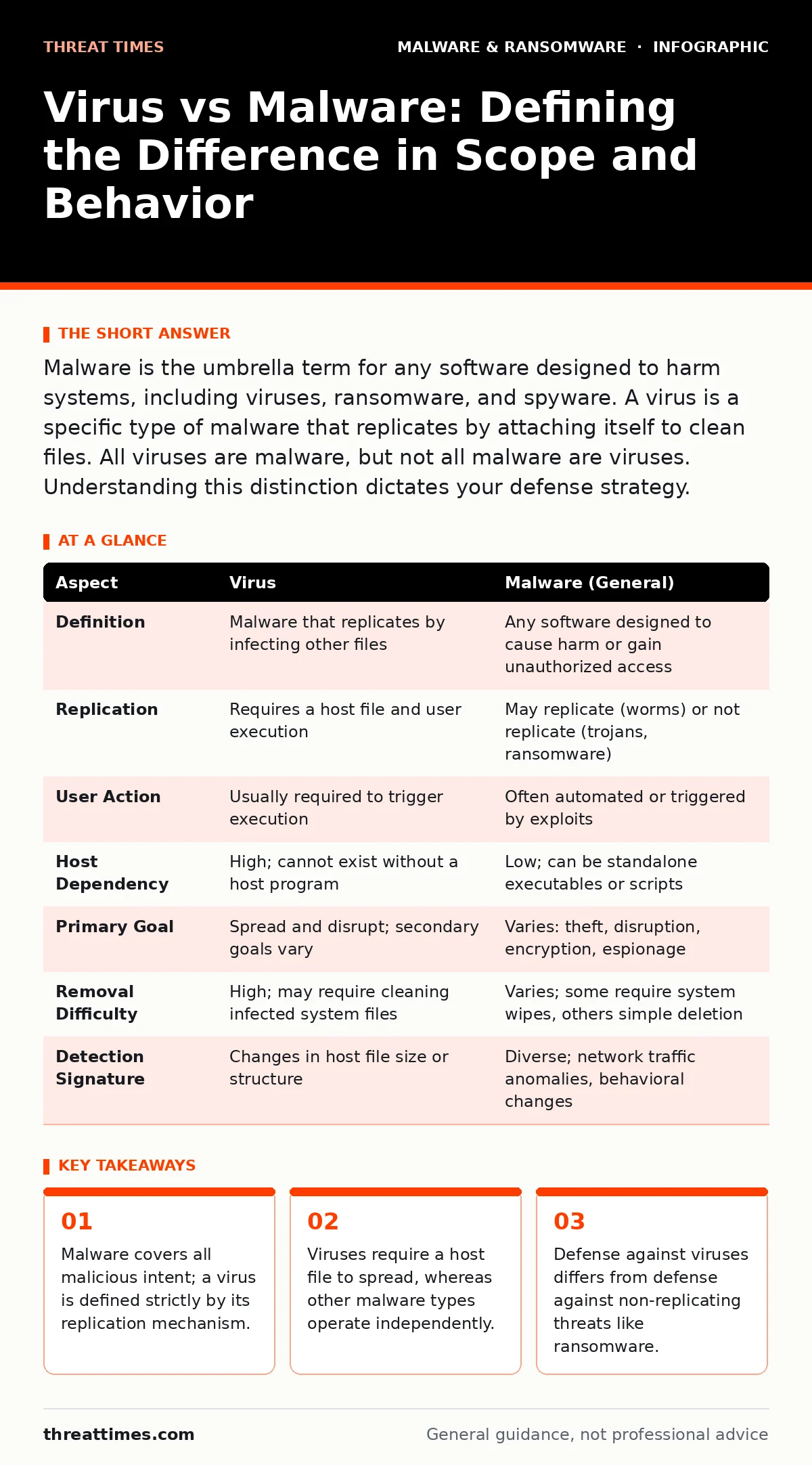
Malware is the umbrella term for any software designed to harm systems, including viruses, ransomware, and spyware. A virus is a specific type of malware that replicates by attaching itself to clean files. All viruses are malware, but not all malware are viruses. Understanding this distinction dictates your defense strategy.
The Scope of the Umbrella Term
Malware is a contraction of malicious software. It refers to any program or file that is intentionally harmful to a computer, laptop, server, or computer network. This category is vast. It includes viruses, worms, trojan horses, ransomware, spyware, and rootkits. When you speak of malware, you are discussing the entire ecosystem of digital threats. The term describes the intent and the effect, not the specific method of delivery or propagation. Security professionals use this broad term when addressing the general state of a system’s security posture.
A virus is a subset of this category. Specifically, a computer virus is a type of malware that replicates itself by modifying other computer programs and inserting its own code. To propagate, a virus requires a host file and a user action to execute that host. It cannot spread without attaching itself to something else. This definition is precise and narrow. If a piece of software causes harm but does not replicate by infecting other files, it is malware, but it is not a virus.
How Propagation Mechanics Diverge
The primary difference lies in how the threat moves through a system. A virus behaves like a biological virus. It needs a carrier. When you open an infected document or run an infected executable, the virus activates. It then scans the storage media for other suitable files to infect. It modifies those files, turning them into new carriers. This chain reaction requires human interaction to trigger each step. You must open the file, or the virus remains dormant.
Other malware types do not rely on this host-dependency. A worm, for example, is standalone malware that replicates itself to spread to other computers. It exploits network vulnerabilities to move laterally without any user action. It does not need to attach to a host file. A trojan horse disguises itself as legitimate software but does not replicate. It sits quietly, waiting for user input to grant access. These mechanics dictate different detection methods. Endpoint detection and response systems look for different indicators of compromise depending on whether the threat is a replicating virus or a standalone worm.
Structural Dependencies and Persistence
Viruses have a structural weakness: they depend on the integrity of their host. If you delete the infected file, you remove the virus. However, if the virus has already infected other files, those copies remain. This creates a hidden cost in remediation. You must scan the entire system to find all infected variants. The virus changes the file it infects, which can corrupt data or alter system behavior in subtle ways.
Non-virus malware often uses different persistence mechanisms. Ransomware encrypts files and demands payment. It does not need to replicate to achieve its goal. Spyware collects data silently. It does not modify other programs to spread. Understanding these structural differences helps you prioritize containment. If you identify a virus, you focus on breaking the replication chain. If you identify ransomware, you focus on network isolation to prevent encryption spread.
A Point-by-Point Comparison
The table below outlines the technical distinctions between the specific category of virus and the general class of malware.
| Aspect | Virus | Malware (General) |
|---|---|---|
| Definition | Malware that replicates by infecting other files | Any software designed to cause harm or gain unauthorized access |
| Replication | Requires a host file and user execution | May replicate (worms) or not replicate (trojans, ransomware) |
| User Action | Usually required to trigger execution | Often automated or triggered by exploits |
| Host Dependency | High; cannot exist without a host program | Low; can be standalone executables or scripts |
| Primary Goal | Spread and disrupt; secondary goals vary | Varies: theft, disruption, encryption, espionage |
| Removal Difficulty | High; may require cleaning infected system files | Varies; some require system wipes, others simple deletion |
| Detection Signature | Changes in host file size or structure | Diverse; network traffic anomalies, behavioral changes |
Strategic Defense Implications
When you choose to defend against a virus, you focus on file integrity and user behavior. You disable macro execution by default. You scan downloaded files before opening them. You verify that system files have not been altered. This approach assumes the threat is latent and waiting for a trigger. You are defending against the moment of activation.
When you choose to defend against broader malware, you must address network perimeter and application security. You patch operating systems to prevent worm exploitation. You use sandboxing to detect trojans that mimic legitimate behavior. You implement least privilege to limit the damage of any successful breach. This approach assumes the threat is active and seeking access. The distinction matters because a strategy that works for viruses may fail against a worm that never requires a file to be opened.
Where the Categories Overlap
The overlap is total in one direction and partial in the other. Every virus is malware. They share the same malicious intent. They are often delivered via the same vectors, such as phishing emails or malicious PyPI packages. The overlap complicates incident response. When you detect an anomaly, it may be a virus, or it may be a different type of malware. You cannot assume it is one or the other without analysis.
This overlap is why broad terminology is common in casual conversation. However, in technical response, precision is required. If you treat a worm as a virus, you may look for infected files that do not exist. If you treat a virus as generic malware, you may miss the need to clean specific host files. The distinction guides your recovery point objective and your containment strategy.
Final Assessment
Understanding the difference between a virus and malware is not merely semantic. It dictates how you build your defense layers. A virus requires controls around file handling and user education. General malware requires controls around network traffic, application whitelisting, and system hardening. You must address both to maintain security. Ignoring the distinction leads to gaps in your monitoring. A virus can hide in plain sight within a trusted document. A worm can hide in network noise. Both require different eyes to see them.
Key takeaways
- Malware covers all malicious intent; a virus is defined strictly by its replication mechanism.
- Viruses require a host file to spread, whereas other malware types operate independently.
- Defense against viruses differs from defense against non-replicating threats like ransomware.
Frequently asked questions
Can a single piece of software be both a virus and ransomware?
No, these are distinct classifications based on behavior. Ransomware encrypts data; a virus replicates by infecting files. A program can contain both capabilities, but it is classified by its primary mechanism of spread and harm.
Does removing a virus delete the original host file?
Yes, typically. Because a virus embeds itself into the host, removing the virus often renders the host file corrupted or unusable. You may need to restore the file from a backup to recover its original functionality.
Are modern operating systems immune to traditional viruses?
No. While modern systems have better memory protection and sandboxing, viruses can still exploit application vulnerabilities. The method of infection may change, but the concept of replicating code attached to a host remains a valid threat vector.
How do I detect a virus without an antivirus program?
You can monitor for unusual changes in file sizes, unexpected execution of system processes, or spikes in CPU usage when no applications are open. These behavioral indicators suggest a replicating threat, though they are not definitive proof of a virus specifically.
How this guide was produced: written by the Threat Times editorial team with AI assistance, checked against the public references listed below, and reviewed when the facts change. See our editorial policy or report an error.